Get faster at logging in CashJot
Amount, category, save. By keeping the entry flow down to three taps at the register, logging becomes an effortless reflex rather than an evening chore.
Updated
On this page
- Clear the entry form with a single tap
- Prioritize your most-used categories
- Save recurring counter purchases as favourites
- Automate fixed recurring bills
- Separate recurring bills from daily spending totals
- Reorder transactions within a day
- Instant access shortcuts
- Glanceable home-screen totals
- Frequently asked questions
- Does tapping the Log tab delete saved entries?
- Why do recurring bills appear in today's spending total?
- Are favourites shared across Expense Groups?
- Can I change the timestamp or order of logged purchases?
Clear the entry form with a single tap#
Tap the Log tab icon at the bottom of the screen while already on the Log tab. The input keypad and notes field clear immediately for a fresh entry, leaving all previously saved transactions untouched.
Prioritize your most-used categories#
The entry form displays your top categories as immediate tap targets above the keypad. Arranging your most frequent tags at the top ensures your category is always one tap away:
- Open Edit Categories from the category selector on the form.
- Drag daily essentials (such as Dining, Groceries, or Transit) to the top of the list.
- Move infrequent categories (such as Electronics or Annual Insurance) toward the bottom.
Save recurring counter purchases as favourites#
For routine transactions with fixed prices and descriptions (such as a morning coffee or daily transit fare), save the entry as a favourite:
- Open any saved transaction from your log.
- Tap Add to Favorites.
Favourites appear as one-tap shortcuts directly beside the entry form, instantly populating amount, description, and category. Favourites are scoped to their respective Expense Group, ensuring everyday lunch spots never clutter a travel ledger. Manage existing shortcuts via Edit Favorites.
For variable purchases, smart autocomplete learns from your history, suggesting merchant names and matching categories as soon as you type the first letter.
Automate fixed recurring bills#
Fixed obligations like rent, utilities, and digital subscriptions belong in the Recurring tab.
Setting up a recurring expense once ensures it appears automatically on schedule, complete with advance reminders. A starter set of recurring entries is free; unlimited schedules are included with CashJot Plus. In-store card payments can also record themselves automatically via Apple Pay capture.
Separate recurring bills from daily spending totals#
Fixed monthly bills landing on the first of the month should not distort your day-to-day discretionary spending.
You can isolate variable spending by tapping the summary card at the top of the Log tab and toggling Exclude Recurring for your chosen timeframes (Today, This Week, or This Month). Spending widgets offer the same Hide Recurring toggle per widget instance.
Reorder transactions within a day#
Transactions are initially listed in the chronological order they were entered. If you recorded a morning coffee during your afternoon commute, you can reorganize entries visually: open any transaction for that date, select Reorder, and drag items into your preferred sequence.
Instant access shortcuts#
Reduce entry friction by launching the keypad directly from outside the app:
- Back Tap: Double-tap the rear glass of your iPhone to jump straight to the keypad.
- Action Button: Map the Action button on iPhone 15 Pro / 16 series to open CashJot instantly. Our one-gesture logging guide walks through configuring Back Tap, the Action button, and Siri shortcuts.
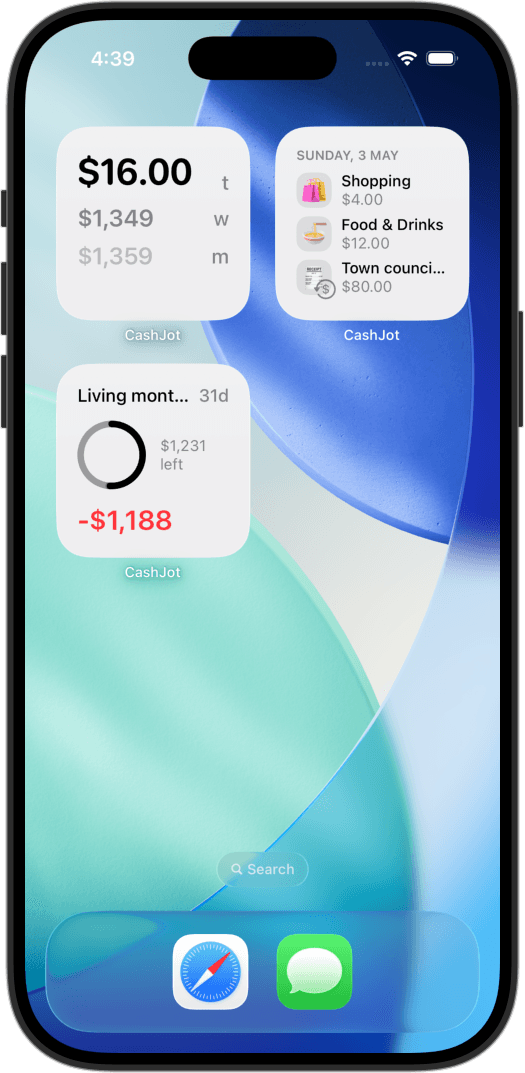
Glanceable home-screen totals#
Placing a home or lock screen widget keeps your daily budget visible throughout the day. Tapping the widget opens the logging keypad immediately, closing the loop between awareness and consistent logging as part of our quick-logging design philosophy.
Frequently asked questions#
Does tapping the Log tab delete saved entries?#
No. Tapping the active Log tab icon only clears the current unsubmitted text fields on the keypad. All existing transaction logs, favourites, and settings remain untouched.
Why do recurring bills appear in today's spending total?#
Scheduled recurring bills count toward daily totals by default. Tap the totals summary card and enable Exclude Recurring to restrict the displayed total to manual and contactless card spending.
Are favourites shared across Expense Groups?#
No. Each Expense Group maintains an independent favourites list. This keeps travel shortcuts and freelance business expenses separate from your personal daily routines.
Can I change the timestamp or order of logged purchases?#
Yes. Open any transaction and select Reorder to drag items into chronological sequence without altering amounts or category assignments.
Track daily spending without the chore
2-second keypad logging, automatic Apple Pay capture, and live home screen widgets. Free, private, and 100% offline.