Guide
How to keep side hustle expenses separate from your personal spending
Published
On this page
- Why the hustle gets its own ledger
- Create the work group
- Keep the name histories separate
- Give it a budget that repeats
- Keep it visible, then hand it off
- The same trick for big one-off purchases
- Troubleshooting
- An entry landed in the wrong group
- Work names keep appearing in personal autocomplete
- The work total looks too small
- Frequently asked questions
- How do I separate business and personal expenses without accounting software?
- How do I keep a big purchase from wrecking my monthly budget?
- Can I track side hustle expenses without linking a bank account?
- Does CashJot track side hustle income?
- What does the year-end CSV include?
- Do I need CashJot Plus for this setup?
The side work gets its own ledger. An Expense Group for the freelance gig, the Etsy shop, or the weekend consulting keeps those costs out of your personal totals, gives them their own budget and reports, and exports the year as a CSV when the accountant asks. The second half of this guide applies the same trick to big one-off purchases, the laptop or the sofa that would otherwise read as a blown month.
Why the hustle gets its own ledger#
Two numbers stop lying to you the moment you split them. Your personal daily average stops absorbing ad spend and packaging supplies, so it stays a number about your life. And the side project's costs stop hiding among groceries, so "what does this thing actually cost to run" becomes one glance instead of a filtering exercise. The freelance page shows what the setup looks like in the app.
Worth being clear about scope: this is a spending ledger, not accounting software. There's no receipt scanning, mileage, or invoicing here (if the work needs those, Expensify or QuickBooks is the right tool, with CashJot alongside as the personal ledger), and CashJot doesn't track income, so revenue and profit live wherever you invoice. The setup below uses a second Expense Group, a budget, and CSV export, which are part of CashJot Plus.
Create the work group#
- On the Log tab, tap the group name at the top to open the group picker.
- Tap New Expense Group and name it after the work: "Side Project," "Etsy," the client's name.
- Pick it whenever you log work spending; the Log tab stays on the group you last used.
The group is a full ledger of its own: separate entries, budget, reports, and currencies. If you bill a client abroad, add their currency to this group with a rate you set; the travel playbook's currency section covers how rates work.
Keep the name histories separate#
In the group's editor, Name Suggestions controls where autocomplete draws from: This Group Only or All Groups. Left on This Group Only, the packaging supplier and the ad platform never surface while you're logging a personal coffee, and the coffee shop never surfaces while you're logging work. Each ledger's autocomplete learns its own vocabulary.
Give it a budget that repeats#
Unlike a trip's dated budget, the hustle usually wants a repeating one: a cap on what the work is allowed to cost. Add a budget on the work group and set Repeat to monthly (or weekly, if that's the rhythm the work runs on). A repeating budget answers the recurring question ("is this month's spend normal?") instead of a one-off's ("what did it total?").
Keep it visible, then hand it off#
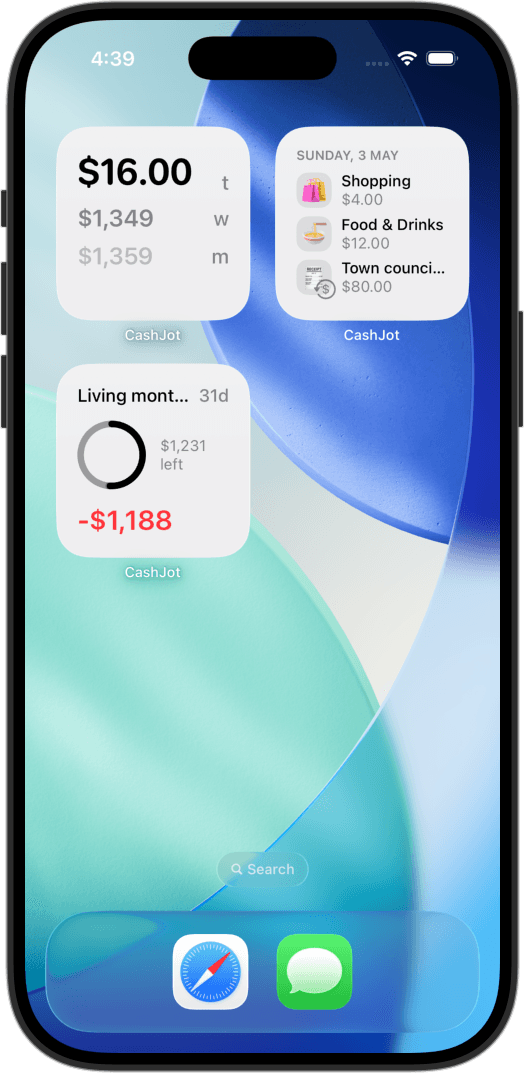
The work group filters everywhere: spending reports and the calendar can show just the hustle, and a widget scoped to the group puts its total or budget progress on a work focus screen. At year-end, open the group and use Export to CSV: each entry carries its date, name, amounts in both currencies, category, and note, ready for a spreadsheet or an email to the accountant.
The same trick for big one-off purchases#
Irregular expenses have the same problem as work expenses: one laptop in the daily group and the month reads as a spending spree, the daily average spikes, and the budget looks blown by a purchase you'd planned for months. The fix is the same ledger split. Create a group for them (the app's own name suggestions include "Big Ticket") and log the laptop, the sofa, and the flights there.
The purchase is still recorded, still totalled, still on its own report when you want it. It just stops rewriting the story your everyday numbers tell. Two related tools for adjacent problems: recurring bills can be hidden from widget totals with the Hide Recurring setting, and a trip's spending earns a whole group of its own.
Troubleshooting#
An entry landed in the wrong group#
Open the entry and change its Expense Group in the editor. For a batch, search is faster: select the entries and use Move to Expense Group to move them all at once.
Work names keep appearing in personal autocomplete#
Set Name Suggestions to This Group Only in each group's editor. On All Groups, every ledger shares one history.
The work total looks too small#
Usually scope: a report or widget pointed at the wrong group, or work entries logged to the daily group before switching. Check which group is active on the Log tab, and check the widget's Expense Groups setting.
Frequently asked questions#
How do I separate business and personal expenses without accounting software?#
Keep two ledgers in one expense tracker: a personal group and a work group, each with its own entries, budget, and reports. Logging stays the same two-second habit; only the active group changes. Accounting software earns its keep at invoicing and taxes, not at "what did the side project cost this month?"
How do I keep a big purchase from wrecking my monthly budget?#
Log it to its own group ("Big Ticket") instead of the daily one. The monthly totals and daily average stay about everyday life, while the purchase stays recorded with its own running total. One-off spending distorts a budget only when it shares a ledger with the routine.
Can I track side hustle expenses without linking a bank account?#
Yes. Every entry is one you log yourself, about two seconds each, and in-store Apple Pay taps can log themselves through a Shortcuts automation if the work spending happens on a card. No bank connection, so nothing to break or re-authenticate.
Does CashJot track side hustle income?#
No. CashJot is a clear view of spending; it doesn't track income, so revenue and profit live in your invoicing tool or spreadsheet. What it gives the hustle is the cost side: what the work spends, against what you said it could.
What does the year-end CSV include?#
Each entry's date, name, amount in its logged currency, the value in your home currency, category, group, whether it was one-time or recurring, and your note. Export from the group and the year is a spreadsheet away.
Do I need CashJot Plus for this setup?#
Mostly yes. Logging is free, and stays free; the second Expense Group, budgets, added currencies, and CSV export are part of CashJot Plus. If you're still deciding how you want to track expenses at all, start there.
Know what today cost you
CashJot is an iPhone expense tracker. Jot each expense in a couple of taps, then see today's total straight from the home-screen widget. Free on the App Store.