
A simple budget that updates as you log
Set a spending limit for the week or month and see your remaining allowance at a glance: no envelopes, no monthly reconciliation, and no bank logins.


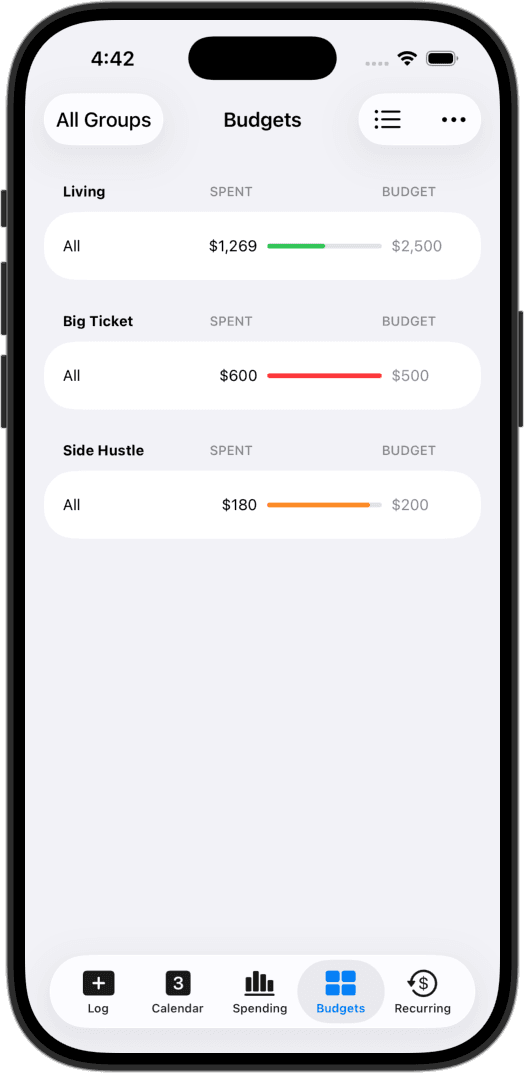
Flexible timeframes
Set spending limits for a day, a week, a month, or a custom date range. Rolling budgets renew automatically, while trip or project budgets end on your chosen date and keep their history intact.
Budget a whole ledger, or just one category
Set an overall budget for your daily living, create a separate spending cap for an upcoming trip, or focus on a single tag like dining out. You can run multiple budgets side by side.
Separate fixed bills from daily spend
Choose whether recurring bills count against your budget limit. Include them to see your entire monthly outflow, or exclude them to keep your budget focused strictly on day-to-day spending.
Pacing widgets on your home screen
The Budget widget shows your pace throughout the day: how much is left, and whether you're over or under target for this point in the cycle. You know where you stand without opening the app.
Pacing over perfection
Traditional budgeting apps often feel like a second job: assigning every dollar to an envelope, reconciling bank statements, and feeling guilty when categories break. CashJot takes a simpler approach based on active pacing.
Pick a spending cap that matches how you live: a weekly limit, a monthly allowance, or a budget for a vacation. As you log purchases or tap with Apple Pay, CashJot shows how much you have left and whether you're on track to finish the cycle under budget.
Frequently asked
No. CashJot uses flexible spending limits and pacing rather than strict zero-based envelope budgeting. If you want to allocate every future dollar to virtual envelopes, apps like YNAB are built for that. CashJot is designed for fast, glanceable awareness: knowing what you can spend today without feeling burdened by upkeep.
Yes. You can attach a budget to a specific tag (like Dining Out or Groceries), or apply it to an entire Expense Group. You can also stack them, such as a broad monthly living limit alongside a specific dining cap.
It's your call. Every budget has an option to exclude recurring expenses. Turn it on to keep fixed bills like rent out of your daily allowance, or turn it off to track your total monthly cash outflow.
Yes. Daily, weekly, and monthly budget periods renew automatically with a fresh limit for the new cycle (unspent balances do not roll over). Custom date ranges stay active until their end date, then archive with their historical totals preserved.
Core daily logging and widgets are free forever. Creating custom budgets, managing multiple Expense Groups, and viewing weekly and yearly reports are included with CashJot Plus.
More ways people use CashJot
- Home and lock screen spending widgets
- Subscription and recurring bill tracking
- Side hustle and freelance expense ledgers
From the blog
Set a spending limit and pace yourself in real time.