Best iPhone expense trackers without bank login (or linked accounts)
If you want privacy and zero sync errors, these four apps represent the main tracking styles on iOS: double-entry bookkeeping, shared wallets, classic checkbooks, and two-second widget logging.
By Pierre Teo · Updated
On this page
- At a glance: which tracker fits your routine?
- How we evaluated the four apps
- The four apps side by side
- Money Manager: full bookkeeping by hand
- Spendee: polish and shared wallets across platforms
- Pocket Expense: checkbook layout with notable caveats
- CashJot: fast, private logging at the counter
- Also looked at, not compared
- Which one should you pick?
- Frequently asked questions
- Is there an expense tracker that doesn't need my bank account?
- Can you use Spendee without linking a bank?
- Which manual expense tracker is the most private?
- Why aren't YNAB or Monarch on this list?
- What is the best free expense tracker without a bank login?
You can track your spending on an iPhone without ever handing an app your bank login or online passwords.
Most finance apps assume you want automated feeds. But connecting a bank means dealing with broken connections, delayed syncs, and third-party data brokers holding your credentials. For anyone who prefers complete control, a dedicated manual-first tracker is both simpler and much more reliable.
At a glance: which tracker fits your routine?#
- Best for desktop-style double-entry bookkeeping: Money Manager (detailed multi-account ledgers, transfers, Android client; free with ads).
- Best for shared household spending with a partner: Spendee (shared wallets across iOS, Android, and web; cloud account required).
- Best for 2-second counter logging, widgets, and privacy: CashJot (no signup, no ads, on-device data, glanceable widgets, in-store Apple Pay automation).
- Traditional checkbook layout: Pocket Expense (bill calendars, but lowest user rating and ad tracking disclosures).
How we evaluated the four apps#
To qualify for this comparison, an app must be fully functional without connecting a bank account. A manual mode awkwardly bolted onto a feed-first app does not qualify.
Each tool must be actively maintained on iOS, with recent updates in the App Store, an established user base, and strong data privacy standards.
These criteria intentionally exclude apps built primarily around automated bank feeds. Platforms like Monarch, Copilot, PocketGuard, and YNAB assume connected bank accounts; if automated feeds are what you want, our breakdown of bank-linked budgeting apps is the place to start.
We verified all pricing and privacy disclosures in September 2026 against US App Store listings, official documentation, and public App Store review data from our study on why budgeting apps lose users.
The four apps side by side#
| Money Manager | Spendee | Pocket Expense | CashJot | |
|---|---|---|---|---|
| Price structure | Free with ads; one-time ad-free purchase; sync is separate subscription | Free tier capped at 1 wallet; 2 subscription tiers; lifetime option | Free with ads; subscription or lifetime unlock | Free core with no ads; optional Plus subscription or lifetime purchase |
| Account required | No | Yes | No for basic use | No |
| Data storage | Local to device; optional paid cloud sync | Vendor cloud, linked to your identity | Local to device; cloud sync requires premium | Local to device and your private iCloud |
| Bank sync | None | Optional, paid, focused on European banks | None | None (in-store Apple Pay capture on-device) |
| Platforms | iPhone, iPad, Android | iPhone, iPad, Mac, Android, web | iPhone, iPad, Mac | iPhone |
| US App Store rating | 4.8 (~19,000 ratings) | 4.6 (~6,200 ratings) | 3.9 (~2,000 ratings) | Fast, private on-device tracker |
Money Manager: full bookkeeping by hand#
Strengths: Money Manager is the closest manual equivalent to full desktop bookkeeping software. It tracks multiple distinct accounts, handles transfers between them, supports credit and debit ledgers, and lets you edit entries from a desktop browser over local Wi-Fi.
It operates local-first with no mandatory account creation, keeps free banner ads unobtrusive, and offers a dedicated Android client.
Trade-offs: The pricing model is split across multiple upgrades: ads in the free tier, a one-time fee to remove ads, and a separate recurring subscription for multi-device sync. In historical review data, 41% of low-star reviews cited bugs or sync friction during device migrations, making local backups essential.
Choose Money Manager if: you want granular multi-account bookkeeping, use Android or cross-platform devices, and prefer deep accounting control over interface minimalism.
Spendee: polish and shared wallets across platforms#
Strengths: Spendee offers a polished, colorful interface and runs across iPhone, iPad, Mac, Android, and web browsers.
Its standout feature is shared wallets, allowing couples or housemates to log expenses into the same ledger. Bank synchronization is optional and housed in the premium tier, meaning Spendee can be used purely as a manual tracker.
Trade-offs: Spendee requires an account, and its App Store privacy label indicates that financial details, contact info, and user identifiers are stored on company servers. The free tier is restricted to one wallet and one budget category. In review data, 32% of negative feedback cited sync issues and 24% criticized major UI redesigns.
Choose Spendee if: you manage shared household expenses with a partner, need full browser access on a laptop, and are comfortable with vendor-hosted cloud storage.
Pocket Expense: checkbook layout with notable caveats#
Strengths: Available since 2011, Pocket Expense is organized around traditional personal finance workflows: account ledgers, bill due-date calendars with reminder alerts, category budgets, and passcode protection.
Trade-offs: Pocket Expense carries the lowest rating in this comparison at 3.9 stars. The free tier displays ads, and privacy disclosures list location data collection alongside tracking identifiers across third-party websites. User reviews frequently report sync inconsistencies and lost transaction histories.
Choose Pocket Expense if: bill-due-date tracking in a classic checkbook layout is your priority and the privacy disclosures are acceptable. For most manual workflows, Money Manager delivers greater stability and depth.
CashJot: fast, private logging at the counter#
Strengths: CashJot is built specifically for two-second logging at the register. The keypad opens immediately on launch: type the amount, tap a category tag, and save.
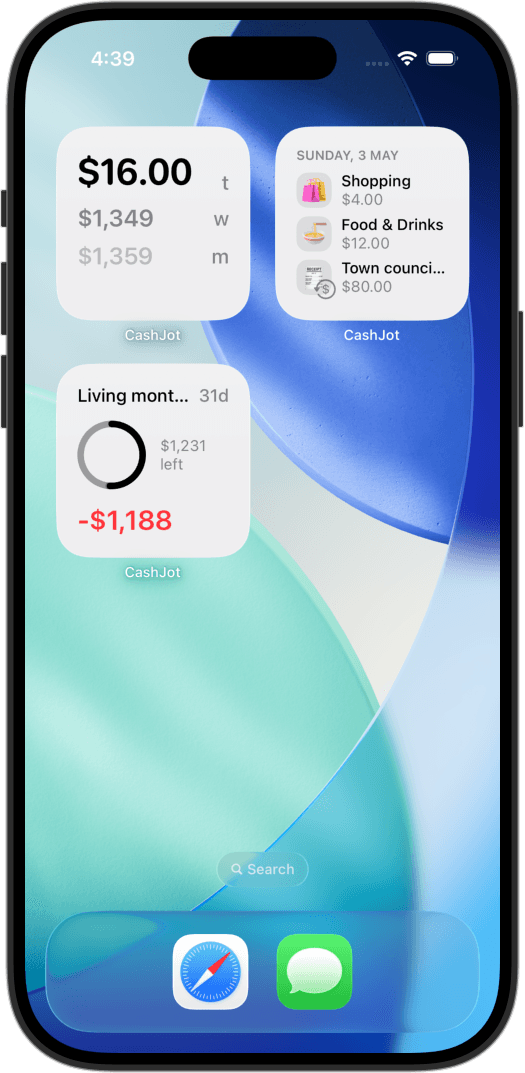
Native widgets display today's, this week's, and this month's totals directly on your home and lock screens without opening the app. There are no user accounts, no advertisements, and no third-party servers; entries stay on your iPhone and sync through your private iCloud.
In-store Apple Pay taps can log themselves via an iOS Shortcuts automation on-device with no bank login. Dedicated Expense Groups let you separate travel, side projects, or home renovations into independent ledgers.
Trade-offs: CashJot is exclusive to iOS, with no web portal, Android client, or multi-user shared ledgers. Because it operates without bank feeds, it does not import historical bank archives or search for forgotten subscriptions. It focuses strictly on real-time spending awareness.
Choose CashJot if: your priority is instant logging at the counter, glanceable home-screen widgets, and keeping financial numbers strictly private on your device.
Also looked at, not compared#
Six additional manual trackers frequently appear in searches:
- Monefy: Fast icon-based entry and clean visual charts (4.7 stars). Cloud sync runs through Google Drive or Dropbox rather than iCloud, with advertising identifiers disclosed in privacy labels.
- Daily Budget Original: In continuous operation since 2013 (4.7 stars) with no bank connections and a "Data Not Collected" privacy label. Calculates a daily spending allowance derived from income and fixed expenses.
- Spending Tracker: A long-standing favorite (4.8 stars) with an accessible Pro upgrade, though its privacy label discloses third-party tracking identifiers.
- Fudget: A monthly list-based planner (4.7 stars) treating income and expenses as running balances. Great for monthly lists rather than point-of-sale logging.
- Money Lover: Comprehensive multi-wallet tracking (4.6 stars) that stores data in the cloud linked to user identity, with cross-app tracking disclosures.
- Buddy: Polished budgeting for couples (4.7 stars). Built primarily around importing bank transactions under a Premium subscription, placing it outside the manual-first category.
Which one should you pick?#
The choice comes down to your primary workflow:
- For complete multi-account bookkeeping, split transfers, and Android support: Money Manager.
- For shared wallets with a partner across mobile and web: Spendee.
- For fast, private mobile logging at the counter with home-screen widgets: CashJot.
If you are still deciding whether an app is the right choice, our comparison of spreadsheets, Notion, and apps and breakdown of manual tracking versus bank feeds examine the broader workflows.
If you are ready to set up a sustainable logging routine on your device, our guide on tracking expenses on iPhone is the best place to begin.
Frequently asked questions#
Is there an expense tracker that doesn't need my bank account?#
Yes. Dedicated manual trackers including Money Manager, Spendee, and CashJot operate without linking bank accounts. You log spending manually, while the app manages category totals, budgets, and visual reports.
Spreadsheets and paper notebooks provide similar independence with different trade-offs in mobile convenience.
Can you use Spendee without linking a bank?#
Yes. Bank synchronization in Spendee is an optional feature included in its highest subscription tier. Its core cash wallets function purely as manual ledgers.
However, you still need to register an account, and your data is stored on Spendee's cloud infrastructure.
Which manual expense tracker is the most private?#
Based on App Store privacy disclosures in August 2026, CashJot and Money Manager operate locally without requiring account registration (Money Manager displays ads in its free tier).
Spendee associates records with an account profile in its cloud. Pocket Expense discloses location tracking and cross-app ad identifiers.
Why aren't YNAB or Monarch on this list?#
YNAB and Monarch are designed primarily around automated bank feeds. While both allow manual entry, their pricing, interface, and workflows assume connected bank accounts.
This comparison focuses strictly on tools designed from the ground up to operate without bank connections.
What is the best free expense tracker without a bank login?#
All major manual apps offer free tiers with specific distinctions: Money Manager displays in-app banner ads, Spendee limits free users to one wallet and one budget category, and CashJot provides ad-free core logging with optional paid power features like Apple Pay automation.
For long-term free use without bank logins, Money Manager and CashJot offer the most practical options.
Written by Pierre Teo, maker of CashJot.
Track daily spending without the chore
2-second keypad logging, automatic Apple Pay capture, and live home screen widgets. Free, private, and 100% offline.