Is Manual Expense Tracking Still Worth It? (When It Beats Bank Feeds)
Manual logging is no longer a slow chore. On a modern iPhone, an entry takes two seconds. When manual tracking beats an automated bank link, and when automated feeds make more sense.
By Pierre Teo · Updated
On this page
- Bank connection and manual log, side by side
- What modern manual tracking looks like
- Where a bank connection is the better fit
- The maintenance that connect screens rarely mention
- What a manual log does well
- Where your spending history lives
- Whichever you choose, ensure data export is available
- The questions that decide the choice
- A regional perspective
- Where CashJot fits
- Frequently asked questions
- Is manual expense tracking still worth it in 2026?
- Is manual or automatic expense tracking better?
- How much time does manual tracking take?
- What happens if I forget to log an entry?
- Can I combine manual logging with bank statements?
- Can I use a budgeting app without linking my bank account?
On a smartphone, manual tracking has evolved into the most direct way to maintain a complete financial ledger.
It captures cash, cards, and contactless taps in a single private log, with in-store Apple Pay taps able to record themselves. It doesn't suit everyone, however, and in specific circumstances an automated bank connection serves you better.
Bank connection and manual log, side by side#
| Bank connection | Manual log | |
|---|---|---|
| Effort | Minimal per transaction after setup | A minute or two a day |
| What gets captured | Card and electronic banking transactions | Everything you log: cash, cards, and taps |
| What gets missed | Physical cash, unsupported institutions | Anything you forget to record |
| Awareness trigger | Later, during statement or import reviews | Immediately at the moment of payment |
| Upkeep | Re-authenticating accounts, deduplicating imports | Maintaining the logging habit |
| Data privacy | Provider servers and data aggregators | Stored locally on your own device |
What modern manual tracking looks like#
The traditional image of manual budgeting is an evening spent sorting physical receipts or updating a complex spreadsheet. On iOS, modern manual tracking is designed around instant mobile entry.
The entry keypad is ready immediately upon launching the app. Most transactions require only an amount and a category tag.
Smart autocomplete suggests merchant names and tags after typing a letter or two; recurring purchases save as one-tap favourites; and fixed subscriptions post automatically on schedule.
On iPhone, in-store Apple Pay taps can even log themselves via an iOS Shortcuts automation without linking your bank, automating a large share of daily spending. The remaining purchases take about two seconds each.
The key advantage is universality: cash, credit cards, contactless taps, and split bills among friends all flow into the same ledger identically, without needing institutional API support.
Where a bank connection is the better fit#
If your primary goal is building a comprehensive historical archive with zero daily effort, automated bank syncing is difficult to beat. Connecting your accounts imports card transactions automatically, often retrieving years of past statements.
This suits tax preparation, auditing forgotten subscriptions, or analyzing multi-year trends, which apps like Copilot and Monarch are built around.
Automation is also ideal if you know a daily logging habit will not fit your lifestyle. Choosing automation is simply a matter of workflow alignment.
The maintenance that connect screens rarely mention#
Bank connections require ongoing maintenance.
In App Store review data of nine major budgeting apps, broken or unsupported bank connections were the single largest complaint among bank-linked apps, accounting for 27% of negative feedback. When a connection disconnects, maintenance falls to the user: re-authenticating credentials, waiting for sync cycles, and manually clearing duplicate entries.
While direct OAuth connections with major national banks generally remain reliable, automation shifts manual work from recording transactions at the counter to managing technical sync issues at your desk.
What a manual log does well#
Universal coverage: Cash purchases, split dinner bills, and foreign bank cards record identically. Because a manual tracker never connects to bank APIs, it functions consistently across any country, network, or offline environment.
Active spending awareness: Contactless payments have removed the friction that once made us conscious of spending. Taking two seconds to record a purchase reintroduces a brief moment of mindfulness, which naturally influences daily spending decisions.
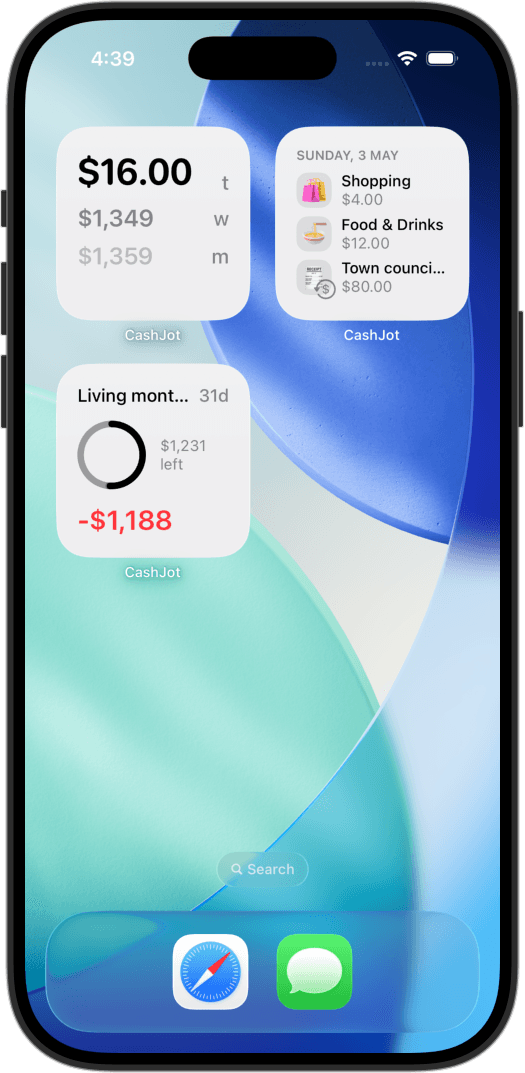
Glanceable daily totals: Placing a home or lock screen widget with today's spending total keeps your budget visible throughout the day, providing an immediate cue if you forgot to record a recent purchase.
The trade-off is completeness: if you skip logging for a week, transactions will not backfill automatically.
Where your spending history lives#
With a bank-linked app, transaction data routes through intermediary data aggregators and resides on third-party cloud infrastructure. Our breakdown of bank-linked budgeting apps details how credentials and histories are managed.
With a manual log, there are no intermediaries. Your financial records can stay stored strictly on your device or in your personal cloud backup, providing the privacy of a personal diary.
Whichever you choose, ensure data export is available#
Manual apps have their own failure mode: in App Store review data, software bugs and lost data accounted for 25% of negative reviews for manual trackers.
Because the log is the product, losing your history is unacceptable. Protect yourself by choosing tools with standard CSV export, and perform occasional backups.
The questions that decide the choice#
- What is your primary goal? For hands-off historical archiving, automated imports excel. For building mindful spending habits, manual logging provides a psychological advantage.
- How much of your spending is cash? Bank feeds capture electronic card movements, but miss physical cash entirely. If a meaningful share of your spending happens in cash, automated feeds will remain incomplete and require manual top-ups anyway.
- Does your financial institution support direct APIs? Bank coverage varies significantly outside North America and Europe. Always verify that connections use your bank's official OAuth login rather than screen scraping.
- Which workflow will you realistically maintain? An automated feed you never review is no more helpful than a manual log you forget to open. Choose the system you can comfortably use on an ordinary Tuesday.
A regional perspective#
CashJot is developed in Singapore, where many local banks do not participate in third-party budgeting APIs.
In many regions, cash remains integral to daily life, and small vendors rarely produce categorized merchant feeds. In these environments, automated feeds contain significant blind spots. Depending on where you live and bank, your circumstances may favor one approach over the other.
Where CashJot fits#
CashJot operates on the manual side: fast two-second logging, with data stored locally on your device and synchronized through your private iCloud storage.
In-store Apple Pay taps can log themselves automatically via an iOS Shortcuts automation without bank logins, while online purchases remain a quick manual entry.
CashJot focuses on real-time spending awareness rather than importing years of bank archives. For users seeking full bank-connected account management, platforms like Copilot or Monarch are dedicated to that purpose, and the decision criteria above help determine the right fit.
Frequently asked questions#
Is manual expense tracking still worth it in 2026?#
For many people, yes. Modern mobile logging has become exceptionally fast: entry forms that accept an amount with one tap, smart autocomplete, and automated Apple Pay capture on iOS.
In an era of contactless card taps, the brief moment of recording a purchase helps restore mindful spending awareness.
Is manual or automatic expense tracking better?#
It depends on your objective. Automatic tracking excels at passive data collection and multi-year historical archives.
Manual tracking excels at active mindfulness, privacy, cash support, and universal compatibility across all banks and countries.
How much time does manual tracking take?#
A couple of seconds per transaction, totaling about one to two minutes per day.
Minimizing input fields is key: a streamlined form that requires only an amount and a category tag remains sustainable long after complex forms are abandoned.
What happens if I forget to log an entry?#
Missing occasional entries is normal. A home-screen widget showing today's total makes missed purchases apparent while they are fresh in your memory.
A few missed incidental expenses do not diminish the broader awareness a spending log provides.
Can I combine manual logging with bank statements?#
Yes, and this hybrid method works well for many users: log daily discretionary spending manually for active awareness, and review monthly bank statements to catch recurring subscriptions or fixed utility bills.
Can I use a budgeting app without linking my bank account?#
Yes. Dedicated manual trackers, spreadsheets, and paper notebooks all operate completely independently of bank connections.
Written by Pierre Teo, maker of CashJot.
Track daily spending without the chore
2-second keypad logging, automatic Apple Pay capture, and live home screen widgets. Free, private, and 100% offline.