The 30-day expense tracking challenge: stop guessing what you spend daily
Most people guess their daily discretionary spending is $20 or $30, only to discover the real number is closer to $65. Here is how to run a 30-day spending awareness challenge on your iPhone without spreadsheets, paper receipts, or quitting on day four.
By Pierre Teo · Published
On this page
- Awareness challenge vs "no-spend" challenge
- Why most 30-day challenges fail by day four
- The 3-step zero-friction iPhone setup
- Step 1: Make your Day 1 guess
- Step 2: Set up instant capture at the register
- Step 3: Put today's total on your lock screen
- The two milestones: Day 7 check-in and Day 30 calendar reveal
- The Day 7 check-in: finding your baseline rhythm
- The Day 30 reveal: the calendar view
- Where to go after Day 30: from record to budget
- Frequently asked questions
- What should I do if I forget to log for two or three days?
- Should I try to cut back on spending during the 30 days?
- Is a 7-day challenge enough, or do I really need 30 days?
- How should I handle cash spending during the challenge?
Ask someone how much they spend in a typical day, and they will usually quote their lunch and their coffee.
They guess $25. But by the time you factor in the mid-afternoon grocery run, the pharmacy stop, the parking meter, and three recurring digital subscriptions quietly renewing in the background, the true daily average is often double or triple that figure.
This is the guessing gap: the psychological distance between what we think we spend and what actually leaves our accounts.
Most financial advice tells you to fix this by downloading a budgeting app and immediately putting strict caps on your life. That is why most budgets fail within the first fortnight. You cannot set realistic spending boundaries for a life you haven't measured yet.
A 30-day expense tracking challenge flips the script: for one month, your only goal is observation. No deprivation, no guilt trips, and no drastic lifestyle overhauls, just an honest, accurate record of what your days actually cost.
Here is why traditional challenges fail, and how to set up your iPhone so you actually finish all 30 days.
Awareness challenge vs "no-spend" challenge#
Online personal finance challenges generally fall into two opposing camps:
- The "No-Spend" Challenge (Restriction): You ban all non-essential spending for 30 days. You buy only groceries and medicine. While popular as an extreme financial reset, it operates like a crash diet: it relies on pure willpower, causes decision fatigue, and frequently leads to a compensatory spending binge the moment the month ends.
- The Spending Awareness Challenge (Observation): You spend exactly as you normally would. Your only commitment is recording every single transaction as it happens.
The purpose of tracking for 30 days is not to scold yourself for buying takeout; it is to eliminate guesswork.
When you know that your daily baseline is $58 rather than $25, you gain the clarity needed to make conscious trade-offs later. You move from vague financial anxiety to concrete data.
Why most 30-day challenges fail by day four#
The intention behind tracking spending is rarely the problem. Friction is.
Every tracking system imposes a "tax" on your attention at the register:
- Pen and paper: Tactile and mindful, but notebooks get left on bedside tables, pens run out of ink, and tallying 30 days of coffee receipts requires manual calculator work.
- Spreadsheets on mobile: Google Sheets and Excel are brilliant on a desktop monitor, but trying to type numbers into small grid cells while walking out of a convenience store is frustrating. Within three days, people start "batching" receipts for Sunday evening, and by week two, the backlog is abandoned.
- Bank-linked aggregators: Automated bank feeds feel effortless, but they defeat the psychological purpose of daily awareness. Transactions lag by two to three business days, pending authorizations shift amounts, and you never look at your spending in the moment it happens.
To survive a 30-day challenge, recording an expense must take less than three seconds, and your running total must stare back at you without requiring you to open an app.
The 3-step zero-friction iPhone setup#
To complete 30 days without burning out, configure your iPhone to handle the heavy lifting:
Step 1: Make your Day 1 guess#
Before you log a single transaction, take a blank note or index card and write down two numbers:
- Your estimated daily discretionary spend: How much do you think you spend on everyday living (food, coffee, transit, small purchases) on an average day?
- Your estimated monthly discretionary total: Multiply that number by 30.
Put this note away until Day 30. Comparing your initial intuition against 30 days of cold, hard data is the most revealing part of the exercise.
Step 2: Set up instant capture at the register#
When you pay for something, the window to record it closes within minutes. If you don't capture it while receipt paper is coming out of the machine, your brain files it away as invisible background noise.
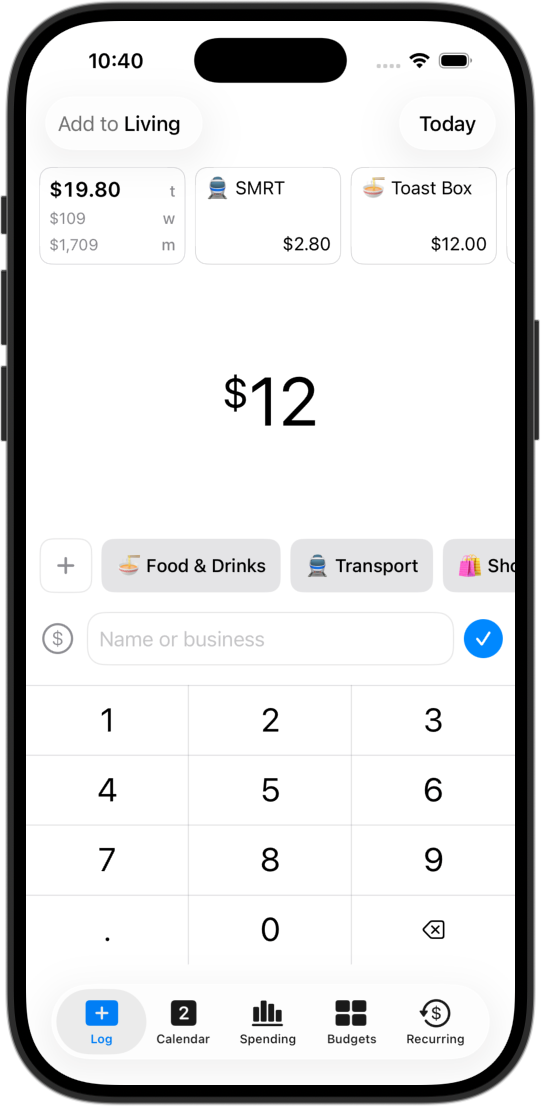
- Open straight to the keypad: In CashJot, the keypad is the home tab on launch. You type the amount, tap a category tag, and you are done. No sub-menus, no loading spinners.
- Use Back Tap or Action Button: You can configure iOS Back Tap or your Action button to launch your logging screen with two taps on the back of your phone.
- Automate Apple Pay taps on-device: On iOS 17 and later, you can set up a personal Shortcuts automation that captures in-store Apple Pay transactions automatically the second your iPhone or Apple Watch touches the terminal. It records the payment on-device with zero bank logins. Online card purchases and cash stay quick manual entries.
Step 3: Put today's total on your lock screen#
The biggest secret to finishing 30 days is ambient awareness.
If you have to remember to open an app to check where you stand, you will forget. But the average person checks their phone dozens of times a day.
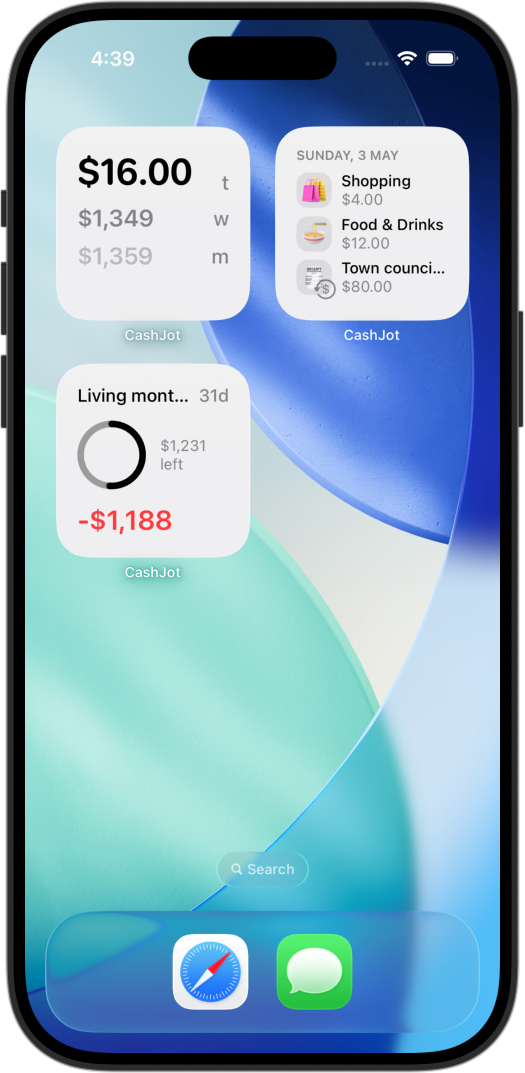
By placing a spending widget on your home screen or lock screen, today's cumulative spend is visible every time you glance at your device.
- When you see that you have already spent $42 by 2:00 PM, you naturally pause before ordering afternoon snacks.
- If you look at your lock screen at dinner and the widget reads $0, you immediately remember that you forgot to log lunch.
The two milestones: Day 7 check-in and Day 30 calendar reveal#
The Day 7 check-in: finding your baseline rhythm#
At the end of your first week, review your transaction list. Do not judge your purchases; simply observe the rhythm of your life:
- Weekday vs weekend spread: Does your weekday burn rate stay steady while your Saturday spikes?
- Invisible leaks: Are there recurring micro-transactions (like vending machines, convenience snacks, or rideshare surges) that appeared four or five times without you realizing it?
- Category count: Are your categories clean? Five to eight broad tags (e.g., Food, Transit, Groceries, Shopping, Fun) are much easier to sustain than 25 hyper-specific buckets.
The Day 30 reveal: the calendar view#
When you reach Day 30, open your spending history in calendar view.
A simple monthly list of numbers is hard for the human brain to contextualize. A calendar display lays out your spending visually across the month:
- Peak spending days: Which specific days saw heavy outlays? Were they planned social events, emergency car repairs, or impulsive weekend splurges?
- Quiet days: How many days did you spend almost nothing?
- The true daily average: Divide your total 30-day discretionary spending by 30.
Now take out the note you wrote on Day 1. Compare your initial guess to your real number.
Almost everyone finds their real daily spending is 30% to 60% higher than they guessed. Seeing that discrepancy on a visual calendar eliminates the mystery of where your paycheck went.
Where to go after Day 30: from record to budget#
Once your 30-day challenge is complete, you have accomplished what 90% of budgeters fail to do: you have built an effortless, consistent logging habit, and you have real baseline data.
Now you have two choices:
- Keep running on pure awareness: For many people, simply keeping the lock screen widget active and glancing at the calendar once a week is enough to keep spending grounded. You don't need a formal budget if awareness alone keeps your finances healthy.
- Set targeted category caps: If your 30-day calendar revealed a specific category that regularly gets away from you (such as dining out or online shopping), you can introduce guardrails.
In CashJot, the core daily spending record, calendar view, and widgets are completely free with no ads and no subscription required. When you are ready to enforce monthly or weekly spending limits on specific categories, CashJot Plus adds flexible envelope-style budgets over your existing record.
If you are deciding which long-term system suits your personality, explore our breakdown of different budgeting methods to match your 30-day data with the right framework.
Frequently asked questions#
What should I do if I forget to log for two or three days?#
Resume logging immediately from today's transactions and ignore the missed days.
The number one reason people abandon a 30-day challenge is the guilt of trying to backfill missing receipts. An active 30-day record with two blank days still provides 93% accuracy and keeps your habit intact. An abandoned tracker gives you zero data.
Should I try to cut back on spending during the 30 days?#
No. For the first month, act as an impartial observer. If you artificially suppress your spending during the challenge, your 30-day total will reflect an unsustainable sprint rather than your actual lifestyle baseline. Live normally, log accurately, and save adjustments for month two.
Is a 7-day challenge enough, or do I really need 30 days?#
A 7-day challenge is a great way to test your logging reflex and understand your weekday-versus-weekend rhythm. However, a full 30-day challenge is essential for capturing monthly subscription renewals, irregular bill cycles, and the full variety of everyday social life.
How should I handle cash spending during the challenge?#
Follow the golden rule of cash: count it once. Either log the ATM cash withdrawal as an expense the moment you pull it from the machine, or leave the withdrawal unrecorded and log individual cash purchases at the counter. Never do both, or you will double-count your spending. If you frequently handle paper bills, read our guide on tracking cash spending on iPhone.
Written by Pierre Teo, maker of CashJot.
Track daily spending without the chore
2-second keypad logging, automatic Apple Pay capture, and live home screen widgets. Free, private, and 100% offline.