
A log built for the small stuff that adds up
Opens straight to the keypad so you can log a coffee in two seconds at the counter. Favourites and autocomplete make repeats instant, while qualifying in-store Apple Pay taps record automatically.


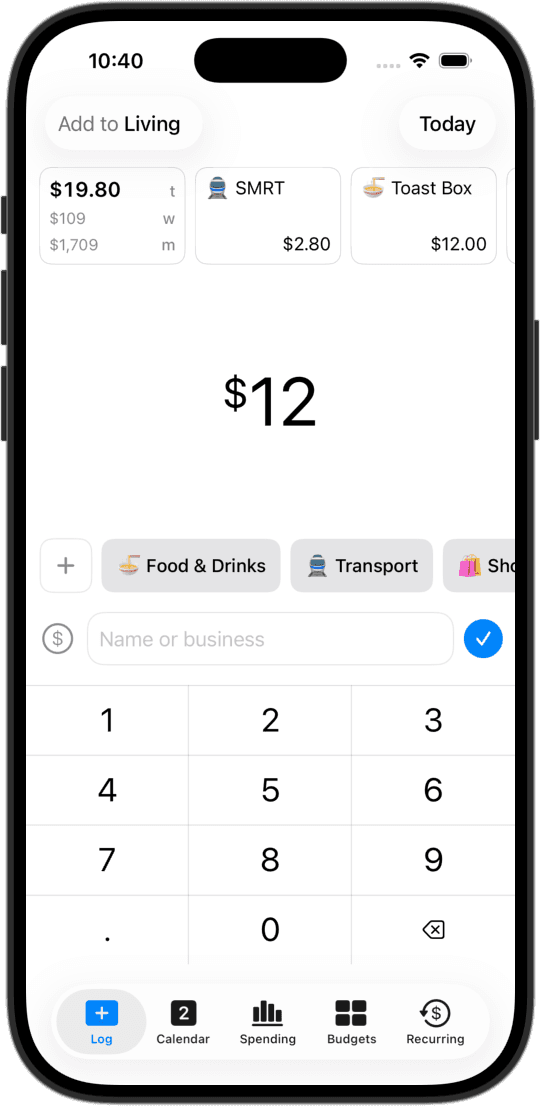
Opens ready to log
No splash screens, no popups, and no nested menus. CashJot opens straight to the numbers. Type the amount, tap a category tag, and save. The form resets instantly for the next purchase.
One-tap favourites for daily routines
Save your morning espresso, regular transit commute, or weekday lunch spot as a favourite. Re-log the exact amount and category with a single tap beside the keypad.
Instant launch from your home screen
Home and lock screen widgets keep today's spending total visible before you even open the app. Tap any widget to jump straight to the keypad without searching for the app.
Apple Pay taps, logged automatically
Set up a simple Shortcuts automation, and qualifying in-store Apple Pay taps record to your log with merchant names and amounts. Everything runs locally on your device with zero bank logins. See how to set it up.
Designed so the habit actually sticks
Most expense tracking routines fall apart on small, repetitive purchases: the morning coffee, the subway tap, or quick cash spent on lunch. By the end of the day, you've forgotten the amounts, and logging feels like homework.
CashJot removes the friction by treating logging like taking a quick note. With smart autocomplete for frequent merchants, one-tap favourites, and home screen widgets, recording an expense takes two seconds right at the counter.
Want to speed up your routine even more? Check out our guide to fast logging on iPhone.
Frequently asked
Yes. While logging at the counter takes two seconds, batching in the evening works just as well. Autocomplete and one-tap favourites make it quick to enter several purchases in a row, and the keypad resets immediately after each save.
It needs a quick, one-time automation in Apple's built-in Shortcuts app. Once set up, qualifying in-store card taps record automatically with merchant names and amounts. Our step-by-step Apple Pay guide walks you through the 2-minute setup.
Captures are saved safely on your device. Open CashJot and tap the capture tray icon on the Log tab, or check Settings → Apple Pay → Captures to review them whenever you're ready.
Spending and transaction widgets open CashJot straight to a blank keypad so you can type immediately. Only Apple Pay capture notifications open with a prefilled amount and merchant details for your confirmation.
Favourites work best for frequent counter purchases like coffees or lunches. For fixed monthly commitments like Spotify or gym memberships, create a recurring expense so it records automatically on its due date.
Yes. The core logging keypad, favourites, autocomplete, and spending widgets are free forever with no ads. Automatic Apple Pay capture is part of CashJot Plus.
More ways people use CashJot
- Automatic Apple Pay expense capture setup
- Simple budgeting with real-time pacing
- Private on-device tracking with no bank login
From the blog
Log your next coffee in two seconds.