
Track travel expenses without the spreadsheet
Keep vacation spending in its own space with a budget matched to your travel dates. Log offline in foreign currencies, see live home-currency conversions, and skip the post-trip receipt scramble.


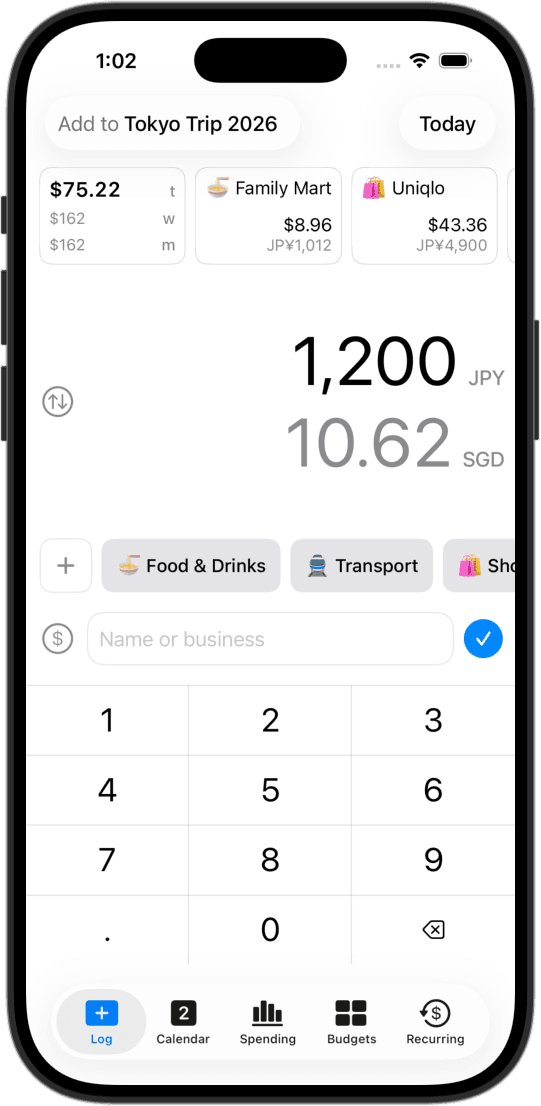
A separate space for your trip
Create a dedicated Expense Group for your vacation. Holiday dining and flights stay in their own ledger, so trip splurges never distort your regular monthly living baseline.
Budgets matched to your trip dates
Set a budget with start and end dates that match your itinerary. CashJot shows your daily pacing on the road, so you know if there's room for a special dinner before you get home.
Log in local currency, see home totals
Add the local currency with a custom exchange rate and log prices as you see them on menus and price tags. CashJot records both amounts and calculates all reports in your home currency.
Trip widgets on your home screen
Home screen widgets display today's vacation spend and remaining trip budget, letting you check your pace during a layover or before dinner without opening the app.
Works 100% offline
No roaming data needed. Entries save instantly to your device whether you're mid-flight or in a remote mountain town, syncing privately via iCloud when you're back online.
Step-by-step travel setup
Setting up a trip ledger takes less than two minutes. Our travel setup guide walks through creating a trip group, locking in custom exchange rates, and archiving the ledger when you return.
Living or working abroad?
The same system works for long-term stays. Set up an Expense Group for your destination in the local currency for rent, groceries, and transit, while keeping a home-currency ledger for recurring commitments back home.
Each space runs its own budgets and reports, while daily logging stays identical: amount, tag, save.
Frequently asked
Create an Expense Group for your destination, set the local currency and exchange rate, and log purchases as you make them. CashJot saves both the local price and your home-currency equivalent.
Yes. You can add several foreign currencies to a single trip group, each with its own conversion rate. Or, create separate Expense Groups for each leg of your trip (like Tokyo in JPY and Seoul in KRW).
Yes. Create a budget, set Repeat to Never, and choose your departure and return dates. Pacing updates actively while you're away and freezes once the trip ends.
Yes. CashJot is fully offline-first. Record purchases on planes, subways, or anywhere without signal. Everything syncs via iCloud when connectivity returns.
Log cash purchases at the counter in two seconds, or record the initial ATM withdrawal directly. Cash entries sit right alongside card taps in your trip budget.
If you use a travel card (like Wise or Revolut), leave the Shortcuts automation Currency Code empty. Each Apple Pay tap will automatically adopt the local currency. Read our Apple Pay setup guide for details.
Yes. Keep a local Expense Group in your everyday currency and a secondary home ledger for domestic subscriptions. Both stay cleanly separated.
Your primary home ledger is free forever. Creating dedicated trip Expense Groups, adding foreign currencies, setting trip-length budgets, and CSV exports are part of CashJot Plus.
More ways people use CashJot
- Home and lock screen spending widgets
- Private on-device tracking with no bank login
- Automatic Apple Pay expense capture setup
From the blog
Set up your trip ledger before takeoff.