How to see your Apple Pay transaction history on iPhone (and why Wallet isn't a tracker)
Published
On this page
- How to view your Apple Pay history in Wallet
- Key limitations of Apple Wallet for budgeting
- Turning contactless taps into a unified record
- Frequently asked questions
- Can I export my Apple Pay transactions to a spreadsheet?
- Does Apple Wallet show total monthly spending?
- Why is a recent purchase missing from Wallet?
Apple Wallet maintains a recent transaction history for each payment card on your iPhone. While convenient for verifying whether a specific purchase went through, Wallet is designed as a digital receipt drawer rather than an expense tracker: it provides no unified spending totals, no multi-card category breakdowns, and no coverage for cash or non-contactless payments. Here is how to view your history and convert those individual taps into an actionable budget.
How to view your Apple Pay history in Wallet#
- Open the Wallet app on your iPhone.
- Tap the specific credit or debit card used for payment.
- Your latest transactions appear directly beneath the card image. Tap any transaction to view timestamps and merchant details.
As noted in Apple's official documentation, the transactions displayed in Wallet reflect data transmitted by your card issuer. Financial institutions vary in how many past transactions they synchronize and how quickly details appear.
Apple Card and Apple Cash exceptions. Apple Card features built-in category summaries and monthly spending totals (Apple Card transaction history), retaining history longer than third-party bank cards. Apple Cash maintains its own dedicated transaction ledger.
Key limitations of Apple Wallet for budgeting#
Standard third-party bank cards in Apple Wallet have several structural limitations:
- No aggregate spending totals. Wallet does not calculate daily, weekly, or monthly spending totals across your cards.
- No category budgeting. Third-party bank cards lack category breakdowns (e.g., total spent on groceries or dining).
- No data export. You cannot export a CSV or spreadsheet of transactions directly from a bank card in Wallet.
- Missing payment methods. Wallet cannot record cash purchases, secondary bank cards, local QR payments, or online web orders paid through other channels.
Wallet answers "did my contactless payment process?", but cannot answer "how much did I spend this week across all accounts?" Answering that requires a single unified ledger.
Turning contactless taps into a unified record#
You can bridge Wallet transactions into a complete spending log using three approaches:
- Monthly bank statement reviews. Review your bank app or monthly PDF statement. This provides a complete archive for that specific account, though it requires manually adding cash and secondary cards.
- Two-second manual logging. Record the amount and category tag at the counter in a dedicated tracking app. Our iPhone expense tracking guide breaks down workflows that make this habit last.
- Automated Shortcuts capture. On iOS 17 and later, a Wallet automation in Apple's Shortcuts app can capture in-store contactless taps on-device and record them automatically in CashJot without bank logins. Step-by-step Apple Pay automation setup.
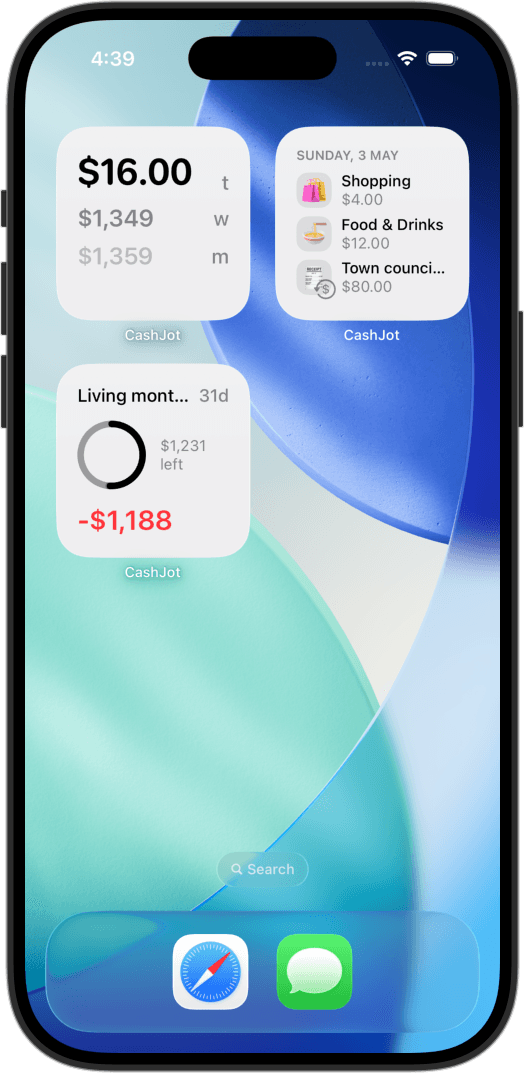
Automating tap capture turns Wallet's isolated receipts into a live, glanceable total on your iPhone spending widget, sitting alongside your cash and manual entries.
Frequently asked questions#
Can I export my Apple Pay transactions to a spreadsheet?#
Not directly from Apple Wallet for standard bank cards; you must export statements from your bank's own online portal. Apple Card users can export monthly statements from the card screen. Using an expense tracker with automated Apple Pay capture allows you to export a unified CSV containing all card, cash, and QR expenses.
Does Apple Wallet show total monthly spending?#
For standard third-party bank cards, no; it only displays an unsummed list of recent transactions. Apple Card provides monthly totals. For a comprehensive total across multiple bank accounts and cash, you need a dedicated tracking app.
Why is a recent purchase missing from Wallet?#
Wallet displays only what your card issuer transmits to your device. Some institutions delay settlement notifications or omit certain authorization types. Apple recommends checking your official banking app for final settlement records.
Know what today cost you
CashJot is an iPhone expense tracker. Jot each expense in a couple of taps, then see today's total straight from the home-screen widget. Free on the App Store.