How to track subscriptions and bills on iPhone without a bank login
Published
On this page
- Audit your existing subscriptions
- Schedule recurring expenses once
- Configure advance renewal reminders
- Skip cycles and adjust one-time amounts
- Separate fixed commitments from daily spending totals
- Review your annual fixed cost baseline
- Understanding functional scope
- Frequently asked questions
- How do I find all active subscriptions on my iPhone?
- Can I track subscriptions without linking my bank account?
- How do I prevent rent from making my daily spending widget look overspent?
Most recurring commitments are already documented across your phone, email, and monthly statements. By auditing these services once and scheduling them in your expense tracker, bills log themselves automatically on due dates, send advance reminders before renewals, and remain cleanly separated from your daily spending totals—all without linking a bank account.
Audit your existing subscriptions#
Gather your recurring commitments across three primary sources:
- Apple App Store Subscriptions: Open Settings, tap your Apple Account name at the top, then select Subscriptions (Apple subscription management guide). This lists all active and expired services billed through Apple, along with renewal dates and pricing. Toggle on Renewal Receipt Emails for immediate confirmation receipts.
- Credit and Debit Statements: Review your previous month's statement for directly billed services: gym memberships, streaming platforms, utilities, rent, and insurance policies.
- Email Receipts: Search your inbox for terms like "renewal", "subscription", or "invoice" to surface annual policies and software licenses that may not have billed in the past month.
Schedule recurring expenses once#
In CashJot, recurring obligations are managed in the Recurring tab:
- Tap Add Recurring Expense.
- Enter the amount, description, category tag, and frequency (weekly, monthly, or yearly).
- Select the start date and due schedule.
Once saved, entries post automatically to your spending log on each due date. Rent on the 1st, software on the 12th, and annual car insurance in March record reliably without requiring manual memory. A starter set of recurring schedules is free; unlimited recurring entries are included with CashJot Plus.
Configure advance renewal reminders#
Every recurring entry can trigger proactive notifications ahead of billing dates: on the due date, one day before, three days before, or one week in advance. Setting advance notifications is particularly useful for trial subscriptions you plan to evaluate or annual policies you wish to review. Notifications for multiple bills falling on the same day are automatically grouped into a single morning alert.
Skip cycles and adjust one-time amounts#
If a gym membership freezes for a month, an introductory trial extends, or a utility bill varies slightly, you can adjust individual cycles without disrupting your underlying schedule:
- Skip an occurrence: Dismisses that cycle's entry while maintaining future recurring dates.
- Edit a single cycle: Adjust the logged amount for the current month without altering the master recurring template.
Separate fixed commitments from daily spending totals#
Major fixed bills landing on the 1st of the month should not distort your day-to-day discretionary spending awareness:
- Log Tab Totals: Tap the summary card at the top of the Log tab and enable Exclude Recurring for your preferred timeframes (Today, This Week, or This Month).
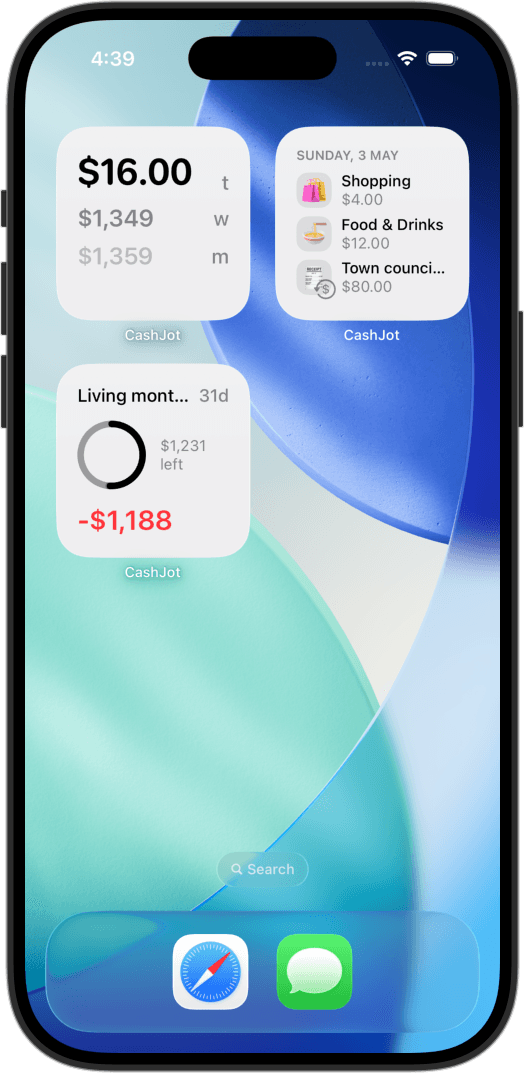
- Home Screen Widgets: Enable Hide Recurring in widget settings so your home screen total reflects only active counter purchases.
- Upcoming Bills Widget: Place the dedicated Upcoming Recurring widget on your home screen to see your next three bills with relative countdowns.
Review your annual fixed cost baseline#
Weekly, monthly, and yearly reports summarize recurring commitments alongside variable spending, isolating your fixed recurring baseline. Reviewing your cumulative annual subscription total provides clear clarity before signing up for new recurring services.
Understanding functional scope#
Scheduling recurring bills manually manages known, active commitments with zero privacy exposure. It does not scan bank accounts to discover forgotten subscriptions automatically. If you require continuous bank account scraping to identify inactive services, a bank-linked service is designed for that purpose, with the technical and privacy trade-offs that bank feeds entail.
Frequently asked questions#
How do I find all active subscriptions on my iPhone?#
For Apple-billed services, go to Settings → Apple Account → Subscriptions. For third-party services billed directly, review last month's bank statement and search your email inbox for keywords like "subscription" or "renewal".
Can I track subscriptions without linking my bank account?#
Yes. Schedule your active bills once in your tracker's recurring ledger. They post on schedule and dispatch advance reminders before billing dates, completely independent of bank integrations.
How do I prevent rent from making my daily spending widget look overspent?#
Enable the Hide Recurring toggle in the widget's settings (long-press the widget → Edit Widget). The bill remains logged in your monthly report while keeping your daily home-screen widget focused solely on variable spending.
Know what today cost you
CashJot is an iPhone expense tracker. Jot each expense in a couple of taps, then see today's total straight from the home-screen widget. Free on the App Store.